CSRF and SSRF sound like they’re related - they both have “request forgery” in the name, after all. But they’re completely different beasts that’ll bite you in completely different ways.
I’ve spent way too many nights debugging both of these vulnerabilities, and the confusion between them has cost teams serious security incidents. Let me break down exactly what each one does and how to stop them before they wreck your app.
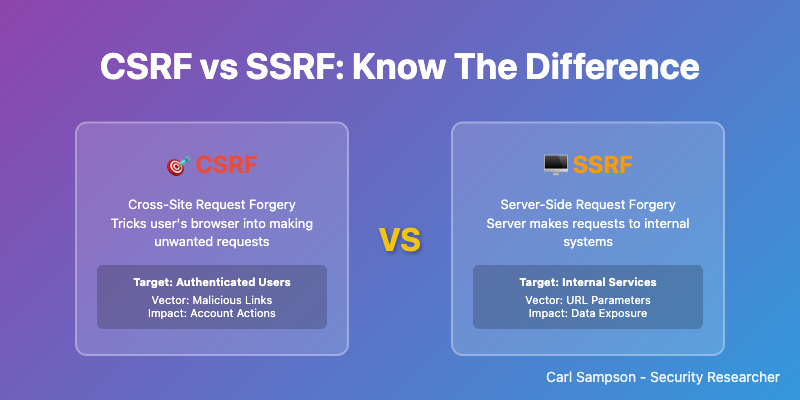
Quick Comparison: CSRF vs SSRF
| Aspect | CSRF | SSRF |
|---|---|---|
| Target | User’s browser | Application server |
| Attack Source | External websites | User input/API calls |
| Exploits | User session trust | Server request trust |
| Primary Risk | Unauthorized user actions | Internal system access |
| Common Impact | Account takeover, data modification | Data exfiltration, privilege escalation |
| Prevention | CSRF tokens, SameSite cookies | Input validation, network segmentation |
What is CSRF (Cross-Site Request Forgery)?
CSRF attacks exploit the trust that a website has in a user’s browser. When a user is authenticated to a website, their browser automatically includes session cookies with every request. Attackers exploit this by tricking users into making unintended requests to the target site.
How CSRF Attacks Work
- User logs into a legitimate website (bank.com)
- Browser stores authentication cookies
- User visits a malicious website while still logged in
- Malicious site triggers a request to bank.com
- Browser automatically includes authentication cookies
- Bank processes the request as if user intended it
Real CSRF Attack Example
Vulnerable Transfer Endpoint:
// Vulnerable Node.js endpoint
app.post('/transfer', (req, res) => {
    // No CSRF protection!
    const { amount, toAccount } = req.body;
    const userId = req.session.userId; // From session cookie

    transferMoney(userId, toAccount, amount);
    res.json({success: true});
});
Malicious Website Code:
<!-- Attacker's website -->
<form id="attack" action="https://bank.com/transfer" method="POST">
    <input type="hidden" name="amount" value="10000">
    <input type="hidden" name="toAccount" value="attacker-account">
</form>
<script>
    document.getElementById('attack').submit(); // Auto-submit
</script>
When the victim visits the malicious site while logged into the bank, $10,000 gets transferred automatically!
What is SSRF (Server-Side Request Forgery)?
SSRF attacks exploit the trust that external services have in your application server. Attackers manipulate your server into making requests to unintended destinations, often accessing internal resources that should be protected.
How SSRF Attacks Work
- Application accepts user-provided URL
- Server makes request to that URL
- Attacker provides internal/malicious URL
- Server requests internal resources
- Attacker gains access to sensitive data
Real SSRF Attack Example
Vulnerable Image Resize Endpoint:
# Vulnerable Python Flask endpoint
@app.route('/resize-image', methods=['POST'])
def resize_image():
    image_url = request.form.get('url')

    # No validation - DANGEROUS!
    response = requests.get(image_url)

    # Process image...
    return process_image(response.content)
SSRF Attack Payloads:
# Access AWS metadata (steal credentials)
POST /resize-image
url=http://169.254.169.254/latest/meta-data/iam/security-credentials/

# Access internal admin panel
POST /resize-image
url=http://192.168.1.100:8080/admin

# Read local files
POST /resize-image
url=file:///etc/passwd
Key Differences: Impact and Scope
CSRF Impact
- Account takeover - Change passwords, email addresses
- Unauthorized transactions - Money transfers, purchases
- Data modification - Update profiles, post content
- Privilege escalation - Add admin users
SSRF Impact
- Internal network access - Discover and access internal services
- Cloud metadata theft - Steal AWS/GCP/Azure credentials
- File system access - Read sensitive configuration files
- Port scanning - Map internal network infrastructure
Prevention Strategies
CSRF Prevention
1. CSRF Tokens (Primary Defense)
// Express.js with csurf middleware
const csrf = require('csurf');
const csrfProtection = csrf({ cookie: true });

app.use(csrfProtection);

app.get('/transfer', (req, res) => {
    res.render('transfer', { csrfToken: req.csrfToken() });
});

app.post('/transfer', (req, res) => {
    // Token automatically validated by middleware
    transferMoney(req.session.userId, req.body.toAccount, req.body.amount);
});
<!-- HTML form with CSRF token -->
<form action="/transfer" method="POST">
    <input type="hidden" name="_csrf" value="{{csrfToken}}">
    <input type="number" name="amount" required>
    <input type="text" name="toAccount" required>
    <button type="submit">Transfer</button>
</form>
2. SameSite Cookie Attribute
app.use(session({
    secret: 'your-secret',
    cookie: {
        sameSite: 'strict', // or 'lax'
        secure: true,       // HTTPS only
        httpOnly: true      // Prevent XSS
    }
}));
3. Origin/Referer Header Validation
function validateOrigin(req, res, next) {
    const origin = req.get('Origin') || req.get('Referer');
    const allowedOrigins = ['https://yourdomain.com'];

    if (!allowedOrigins.some(allowed => origin && origin.startsWith(allowed))) {
        return res.status(403).json({error: 'Invalid origin'});
    }
    next();
}
SSRF Prevention
1. Input Validation and Allowlisting
# Python example with comprehensive validation
import re
from urllib.parse import urlparse
from ipaddress import ip_address, AddressValueError

def is_safe_url(url):
    try:
        parsed = urlparse(url)

        # Only allow HTTP/HTTPS
        if parsed.scheme not in ['http', 'https']:
            return False

        # Block private IP ranges
        try:
            ip = ip_address(parsed.hostname)
            if ip.is_private or ip.is_loopback:
                return False
        except (AddressValueError, TypeError):
            pass

        # Allowlist domains only
        allowed_domains = ['cdn.trusted.com', 'api.partner.com']
        if parsed.hostname not in allowed_domains:
            return False

        return True
    except:
        return False

@app.route('/fetch-image', methods=['POST'])
def fetch_image():
    url = request.form.get('url')

    if not is_safe_url(url):
        return jsonify({'error': 'Invalid URL'}), 400

    response = requests.get(url, timeout=5)
    return process_image(response.content)
2. Network Segmentation
# Firewall rules to block SSRF
iptables -A OUTPUT -d 169.254.169.254 -j DROP    # AWS metadata
iptables -A OUTPUT -d 10.0.0.0/8 -j DROP         # Private networks
iptables -A OUTPUT -d 172.16.0.0/12 -j DROP
iptables -A OUTPUT -d 192.168.0.0/16 -j DROP
iptables -A OUTPUT -d 127.0.0.0/8 -j DROP        # Localhost
🎯 Practice the SSRF half: The SSRF Target Simulator covers the server-side case hands-on — reach a simulated metadata endpoint past a filter you control. No real requests are made.
Testing for Both Vulnerabilities
CSRF Testing
# Test with curl (should fail without token)
curl -X POST https://target.com/transfer \
  -d "amount=1000&toAccount=attacker" \
  -b "session=valid_session_cookie"

# Test SameSite protection
curl -X POST https://target.com/transfer \
  -H "Origin: https://evil.com" \
  -d "amount=1000&toAccount=attacker"
SSRF Testing
# Test internal network access
curl -X POST https://target.com/fetch-image \
  -d "url=http://127.0.0.1:22"

# Test metadata access
curl -X POST https://target.com/fetch-image \
  -d "url=http://169.254.169.254/latest/meta-data/"

# Test file access
curl -X POST https://target.com/fetch-image \
  -d "url=file:///etc/passwd"
Framework-Specific Protection
Django (Python)
# CSRF protection (built-in)
MIDDLEWARE = [
    'django.middleware.csrf.CsrfViewMiddleware',
]

# Template
{% csrf_token %}

# SSRF protection
from django.core.validators import URLValidator
from django.core.exceptions import ValidationError

def safe_fetch(url):
    validator = URLValidator()
    try:
        validator(url)
        # Add additional SSRF checks
        return requests.get(url)
    except ValidationError:
        raise ValueError("Invalid URL")
Spring Boot (Java)
// CSRF protection
@EnableWebSecurity
public class SecurityConfig {
    @Bean
    public SecurityFilterChain filterChain(HttpSecurity http) throws Exception {
        http.csrf().csrfTokenRepository(CookieCsrfTokenRepository.withHttpOnlyFalse());
        return http.build();
    }
}

// SSRF protection
@Service
public class SafeHttpService {
    private static final Set<String> ALLOWED_HOSTS = Set.of("api.trusted.com");

    public String safeFetch(String url) {
        try {
            URL parsedUrl = new URL(url);
            if (!ALLOWED_HOSTS.contains(parsedUrl.getHost())) {
                throw new IllegalArgumentException("Host not allowed");
            }
            return restTemplate.getForObject(url, String.class);
        } catch (MalformedURLException e) {
            throw new IllegalArgumentException("Invalid URL");
        }
    }
}
Advanced Attack Scenarios
CSRF: JSON API Attacks
Modern SPAs using JSON APIs are also vulnerable:
<!-- Attacker site -->
<script>
fetch('https://api.target.com/user/update', {
    method: 'POST',
    credentials: 'include', // Include cookies
    headers: {'Content-Type': 'application/json'},
    body: JSON.stringify({email: 'attacker@evil.com'})
});
</script>
Defense: Custom request headers + CORS preflight:
// Require custom header
app.use((req, res, next) => {
    if (req.method === 'POST' && !req.get('X-Requested-With')) {
        return res.status(403).json({error: 'Missing custom header'});
    }
    next();
});
SSRF: DNS Rebinding Attacks
Attackers can bypass IP filtering using DNS:
- Create domain pointing to public IP
- After validation, change DNS to private IP
- Server resolves to internal network
Defense: Re-resolve DNS before making request:
def safe_request(url):
    # Validate initially
    if not is_safe_url(url):
        return None

    # Re-resolve before request
    time.sleep(1)  # Allow DNS changes
    if not is_safe_url(url):
        return None

    return requests.get(url)
Security Checklist
CSRF Prevention Checklist
- CSRF tokens implemented for state-changing requests
- SameSite cookies configured (Strict/Lax)
- Origin/Referer header validation
- Custom headers for API requests
- Proper CORS configuration
SSRF Prevention Checklist
- URL allowlisting implemented
- Private IP ranges blocked
- Network segmentation in place
- Metadata services blocked (169.254.169.254)
- Request timeouts configured
- Response size limits enforced
Frequently Asked Questions
Can CSRF and SSRF be combined in a single attack?
While CSRF and SSRF are different vulnerability types, they can potentially be chained together. For example, an attacker might use CSRF to trigger an SSRF vulnerability in an admin panel, combining user session hijacking with server-side request manipulation.
How do I test for CSRF in single-page applications (SPAs)?
SPAs using JSON APIs need different CSRF protection. Test by attempting cross-origin requests with credentials included. Use custom request headers or double-submit cookies instead of traditional CSRF tokens.
What’s the difference between SSRF and XXE attacks?
SSRF exploits HTTP request functionality, while XXE (XML External Entity) exploits XML parsing. Both can access internal resources, but XXE specifically targets XML processors. SSRF has broader attack surface including any URL-accepting functionality.
Can WAFs prevent both CSRF and SSRF?
WAFs can help detect some attack patterns, but they’re not complete solutions. CSRF requires application-level tokens, and SSRF needs input validation. Use WAFs as part of defense-in-depth, not the primary protection.
How do cloud environments affect SSRF attacks?
Cloud platforms expose metadata services (169.254.169.254) containing sensitive information like IAM credentials. SSRF in cloud environments can be particularly dangerous, potentially leading to full cloud account compromise.
Are there automated tools to test for both vulnerabilities?
Yes - Burp Suite, OWASP ZAP, and Nuclei can detect both CSRF and SSRF vulnerabilities. For CSRF, also test manually with different origins. For SSRF, test various internal IP ranges and metadata endpoints.
Conclusion
CSRF and SSRF represent fundamentally different attack vectors that require distinct defense strategies:
- CSRF targets user trust through browser sessions - defend with tokens and cookie policies
- SSRF targets server trust through request manipulation - defend with validation and network controls
Understanding both vulnerabilities is essential for building secure web applications. Implement proper defenses during development rather than trying to retrofit security later.
Remember: security is a process, not a destination. Regularly test your applications, stay updated on new attack techniques, and maintain robust logging to detect potential attacks.
Related Security Topics
📘 SSRF Deep Dive Series:
- 7 Critical SSRF Attack Techniques - Master SSRF attack methods
- SSRF Prevention Guide - Complete defense strategies
- CVE-2026-27696 Analysis - Real-world SSRF bypass
- CSRF vs SSRF Guide - Compare both vulnerabilities (you are here)
🎯 Web Security Fundamentals
- Content Security Policy Guide - Prevent XSS attacks with CSP headers
- Python Security Guide - Secure coding in Python
- Common Weakness Enumeration - CWE-352 (CSRF) and CWE-918 (SSRF)
🛠️ Hands-On Practice
- Security Playground - Interactive CSRF and SSRF demos
- CSP Toolkit - Test and analyze security headers
📚 Python Developers
- Python Requests Security - Secure HTTP client usage
- Secure Python Applications - Comprehensive vulnerability prevention